


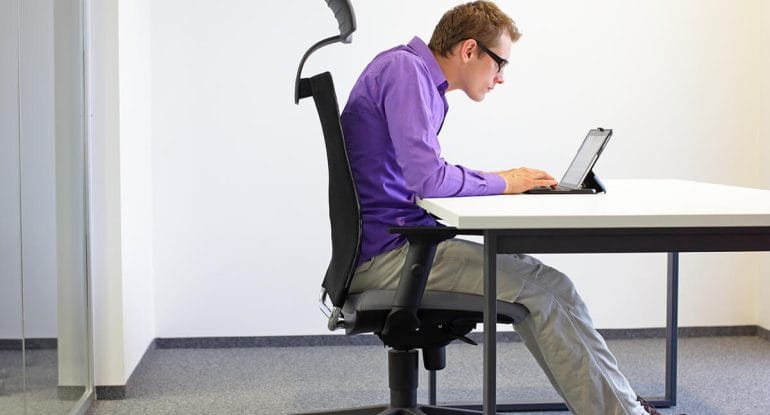
Whether you’re working from home full-time or just a few days a week, your desk setup plays a huge role in your spinal health.
At Fairway Chiropractic Centre in Kitchener, we regularly see patients who are developing neck tension, shoulder pain, and low back stiffness from poor desk posture. Most of them are working at kitchen tables, slouching on the couch with a laptop, or overextending their neck to see multiple screens.
If you want to stay productive and pain-free, your home office must support proper posture and movement throughout the day.
In this article, we’ll cover:
- The best ergonomic desk setup to protect your spine
- How to use a sit-stand desk properly
- Tips for managing multiple monitors without hurting your neck
- When to seek chiropractic care for posture-related pain
Why Posture Matters When You Work
Your spine is designed to move — not to sit in one position for 6–10 hours a day. Bad workstation ergonomics create:
- Forward head posture
- Rounding of the shoulders
- Compression in the lower back
- Increased risk of disc injuries
Over time, these can lead to:
- Chronic tension headaches
- Nerve irritation
- Sciatica
- Shoulder pain
Even worse — most of the damage happens gradually, so you may not notice how much it’s affecting your spine until it’s already an issue.
The Perfect Home Office Setup (Sitting)
Here’s how to set up a desk that supports your spine if you’re seated.
Chair:
- Adjustable height with lumbar support
- Feet flat on the floor (or on a footrest)
- Hips slightly higher than your knees
Monitor:
- Put the height of screen so the part of it you focus on the most is level with your eyes.
- About an arm’s length away
- Directly in front of you — no turning
Keyboard & Mouse:
- Elbows at 90–100° angle, and tucked in at your sides – not out in front of you.
- Wrists straight and relaxed
- Shoulders relaxed, not raised
Extra Tip: Use a rolled towel or small cushion at your lower back if your chair doesn’t support your lumbar curve.
Consider a Sit-Stand Desk
Alternating between sitting and standing can reduce the pressure on your spine — but it must be used correctly.
Benefits of sit-stand desks:
- Encourages movement
- Reduces lower back pressure
- Increases circulation and energy
How to use one effectively:
- Start by standing 15–30 minutes every hour
- Use an anti-fatigue mat when standing
- Keep your screen and keyboard at the same ergonomic height as when seated
Using Multiple Monitors Without Hurting Your Neck

Multiple screens are common — but they often lead to repetitive neck rotation and shoulder strain.
Best practices for multiple monitors:
- Use your primary screen directly in front of you
- Secondary screens should be at the same height
- If using both equally, position them centered in front of you angled slightly inward
- Avoid having to turn more than 30° regularly
Pro Tip: If you use a laptop as one of your screens, elevate it with a stand and use an external keyboard and mouse to avoid hunching.
Movement Is Just as Important as Posture
No matter how perfect your workstation is, static posture is still harmful.
Get up and move every 30–45 minutes.
Try:
- Shoulder rolls
- Spinal twists in your chair
- Standing hip flexor stretches
- Walking during phone calls
I’d recommend you do the YWTL exercise throughout the day, which is found as video number 1 on this page:
👉 https://fairwaychiropractic.com/posture/
When to Seek Chiropractic Help
If you’re experiencing any of the following, it may be time for a Chiropractic Assessment:
- Neck or back pain after sitting
- Numbness or tingling in hands or feet
- Frequent tension headaches
- Poor posture you can’t correct on your own
At Fairway Chiropractic Centre, we help people throughout Kitchener, Waterloo, and Cambridge correct posture problems at their root — not just mask the pain.
With specific adjustments, posture rehab strategies, and ergonomic advice, we’ll help you feel better at your desk and beyond.
Book a Chiropractic Assessment Today
Don’t let your desk be the reason you’re in pain.
We’ll assess your spinal alignment, posture, and movement patterns — and create a personalized plan to relieve pressure, correct imbalances, and help you thrive at work.
👉 Call us at (519) 748-5535
👉 Book Online Now
Your body was designed to move — let’s help it move better, even at your desk.